Friday, December 2, 2016
How to remove HDD user password in Acer laptops
How to remove HDD user password in Acer laptops
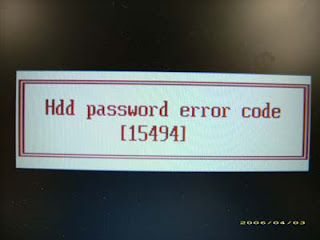
This article provides you with details about removing HDD/BIOS user password. If you key in the wrong HDD password three times, an error code is generated like the one in the picture below.
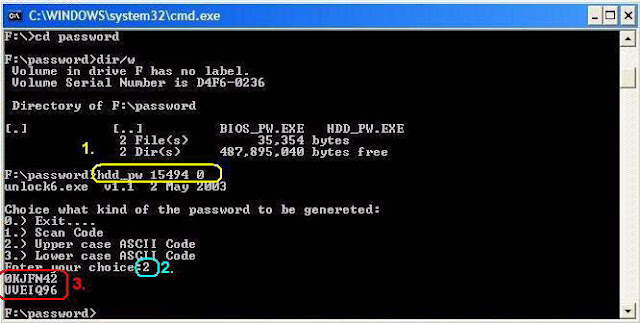
To reset the HDD user password, perform the following steps:
- On a different machine, run the HDD_PW.EXE file along with the error code generated. For example:
hdd_pw 15494 0
- Select an option to generate upper case or lower case ASCII code for unlocking the HDD.
- Two strings are generated as output. Select and note down either one of the strings.
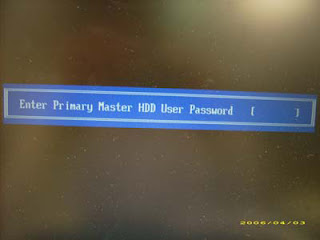
4. Reboot the machine with the locked HDD and then use either one of the strings as the HDD user
password.
Download Link
Available link for download

Epson Stylus Pro 4000 Waste Ink Counter Reset
Epson Stylus Pro 4000 Waste Ink Counter Reset

Printer canon IP1980 perlu direset bila terjadi :
1. blink 4x orange 1x green
2. Green orange berkedip bergantian selama 7x (Ink Absorber Full),
3. Orange 8x ink tank full
Berikut langkah-langkah Reset IP1980 :
1. Driver harus sudah di install. Jika belum punya drivernya klik disini.
2. Printer harus dalam keadaan service mode (temporary reset) .
Untuk mengaktifkan service mode:
4. Cabut power listrik, colokan kembali dan nyalakan (printer initial/tunggu sampai lampu tdk berkedip. Selesai
Cara menjalankan General Service Tool

Selamat mencoba ..................
1. blink 4x orange 1x green
2. Green orange berkedip bergantian selama 7x (Ink Absorber Full),
3. Orange 8x ink tank full
Berikut langkah-langkah Reset IP1980 :
1. Driver harus sudah di install. Jika belum punya drivernya klik disini.
2. Printer harus dalam keadaan service mode (temporary reset) .
Untuk mengaktifkan service mode:
- Cabut kabel power listrik
- Tekan power (di printer)
- Colokan power listrik (lampu akan berwarna hijau)
- Sambil menekan power tekan tombol resume (lampu berubah orange)
- Lepas keduanya (printer akan mati)
- Tekan tombol power lagi dan langsung lepaskan.(lampu akan berwarna hijau) (jangan mencabut power listrik)
4. Cabut power listrik, colokan kembali dan nyalakan (printer initial/tunggu sampai lampu tdk berkedip. Selesai
Cara menjalankan General Service Tool
- Exctrak file yang anda download
- Resolusi Windows harus 1024x768
- Jalankan file "GeneralTool.exe"
- Pilih USB Port
- Centang Cleaning dan Eeprom Clear
- Klik Main
- Klik Platen
- Selesai Quit
- Matikan printer dengan menekan power.
Selamat mencoba ..................
Available link for download
Thursday, December 1, 2016
How To Resetter Canon Printer Pixma MP 237
How To Resetter Canon Printer Pixma MP 237
Free Dowload Resetter Canon Pixma Mp 237.
Resetter Canon MP237 Free Download- Resetter Canon MP237 Free Download– The characteristics of the Canon MP237 printer error when turned on it will immediately appear error P07 / E08 on its LCD panel. And if we do a print command, then appear on the screen monitor will perform The Ink Absorber is Almost Full.
Canon MP237 error P07 and E08 see example image below:
 |
| Canon Pixma MP 237 |
Canon MP237 error P07 and E08 see example image below:
 |
| Ink Tank Full |
Here is how to cope with P07 and E08 Error on Canon MP237 printer:
- Download Resetter Canon MP237 below link.
- Turn on the printer Canon MP237, it will appear in its LCD panel error message P07 / E08, and the caption “The Ink Absorber is Almost Full” on the monitor screen in a computer buddy.
- Canon MP237 printer must be in a state of SERVICE MODE (follow the way of No. 4 and so on).
- Turn off the printer Canon MP237 error P07 / E08 by pressing the POWER button.
- Do not unplug the power cord.
- Press and Hold down STOP / RESET followed by pressing the POWER button.
- So both buttons depressed position.
- Release the STOP / RESET but do not release the POWER button.
- Next, In the circumstances the POWER button is pressed, press the STOP / RESET 6 times.
- Then release both buttons simultaneously.
- Printer will be in Service Mode.
- Canon MP237 LCD panel will be blank / dark and on your computer will detect the new hardware. you must to Ignore it.
- Exctract and Run Service Tool 3400.
- Then, On the menu absorber Clear ink counter please select Main and then click Set on the right.
- Then dimenu ink absorber counter select SET Main clicking on the right.
- Then click EEOPROM. then the printer will print one page.
- So Printer Canon MP237 error P07 / E08 will be normal again.
Download Service Tool 3400
Available link for download
Free Download Canon LBP5975 Driver
Free Download Canon LBP5975 Driver
 |
| Canon LBP5975 Driver |
Free Download Canon LBP5975 Driver
Free Download Canon LBP5975 Driver- This laserlight printer utilizes innovations used in Canons eminent imagerunner family to give unrivaled benefit, unparalleled capacities and phenomenal top quality yield. With various simple to-utilize capacities, the imagerunner lbp5975 makes it be basic for clients to deliver business archives having an expert edge. Never again will you have to yield speed or even abilities when selecting a desktop laser printer for the workplace. A progressive reduced 4-in-1 laser bar scanner unit supports the imagerunner lbp5975 give genuine 1200 dpi bring about Super Good Mode for enhanced picture clarity and also inclinations, or six hundred dpi in Good Mode for definite illustrations. Clients may print sharp and also eye-discovering presentations, new renderings, building charts or even general office paperwork, all at higher rate.The Free Download Canon LBP5975 Driver comprises of Canons influential UFR II Printing Controller. At the point when clients print a record, this canny auto manager construction modeling decides the ideal equalization of transforming between your desktop machine furthermore the LBP gadget through examining the outline and realistic parts of each one page. This astounding methodology aides give quicker yield contrasted with PCL or PS site page portrayal dialects as to complex archives including pictures, representation and content. This smaller printer is viable at yield at to the extent that 30/32 pages every moment in both stunning color and highly contrasting separately. On the off chance that your workgroup must print higher amounts or bigger paperwork, imagerunner lbp5975 effectively handles an assortment of paper sizes, for example, A3. A standard USB 2. 0 High Pace interface empowers immediate connection with a host, in spite of the fact that a 10/100basetx Ethernet client interface encourages imparted make utilization of and remote weighing in organized conditions.
The Free Download Canon LBP5975 Driver vigorous four-drum motor engineering furthermore the On-Demand melding framework work to deliver dazzling fast shade and additionally monochrome reports. Quick transforming connected with huge and entangled reports is further upgraded with the liberal standard memory limit connected with 768 MB, and the discretionary Hard drive. Front-burden access encourages quick and basic upkeep of client replaceable parts for instance drum, toner, fuser and also paper supply. A compact corner stapling capacity is standard about the imagerunner lbp5975, making it helpful for clients to make multi-page reports productively in the print driver. The finisher can staple to the extent that 15 sheets of paper in various staple positions.
Alongside auto-duplexing as standard, you can printing twofold sided reports to diminish paper utilization and give an expert search for your archives. Through the decisions of Postscript 3 copying and also scanner tag distributed, Free Download Canon LBP5975 Driver can fulfill the progressed application needs of situations like the instruction and medicinal services parts. Chairmen might additionally track gadget yield with the same counter program innovation and usefulness used in Canons prestigious imagerunner friends and family. At the point when the Hard drive Option is introduced about the gadget, archives could be set to RIP once after which put away for fast distributed of expansive complex employments. The Hard drive likewise incorporates occupation Spooling gimmick that permits print information to end up spooled on these gadgets so clients can without much of a stretch come back to extra undertakings. The imagerunner lbp5975 offers an advantageous capacity to store normally utilized print employments within different boxes utilizing the Hard drive choice.
Operating System:
- Windows 7
- Windows 8, 8.1
- Windows XP
- Windows Vista
- Mac Os
- Linux
Demonstrating a trade contraption :
- Open Windows Device Manager.
- In the Device Manager check the contraption youre endeavoring to present is not adequately recorded from past present tries. In the doubtful event that the contraption is uncovered highlight it and void it from Device Manager to keep any mishaps all around the present.
- Precisely when Device Manager looks okay reboot the workstation.
- As the machine is rebooting a put in new supplies wizard should show up if Windows uncovers the new fittings using this wizard you should can display Windows the facilitator holding your drivers either on the CD, diskette, or the envelope holding the records you downloaded.
Suggestion: If you are unpracticed with overhauling Canon gadget drivers physically, we exceptionally propose downloading the Canon LBP5975 Driver Utility. This apparatus will download and upgrade the right Canon LBP5975 driver forms naturally, ensuring you against introducing the wrong LBP5975drivers.
Free Download Canon LBP5975 Driver
| For Driver | Download |
| For Windows 8, 8.1 | Download |
| For Windows 7, Windows XP, Windows Vista | Download |
| | |
| For Mac OS | Download |
| For Linux | Download |
Available link for download
GAME GAME 3D FULL VERSI
GAME GAME 3D FULL VERSI

- Processor 800 Mhz or better;
- RAM: minimum 1024Mb;
- DirectX 9.0 or higher;
- DirectX compatible sound board;
- Easy game removal through the Windows Control Panel.
screen shootgame :
Super bike

Helic


ofroad recer
 Bagi yang belum punya account libertyriservesilahkan melakukan pendaptaran terlebih dahulu klik gambar (libertyreserve)untuk dapat menikmati game ini
untuk info tempat pembelian saldo liberty bisa mengunjungi Medangold (moneycahnggeronline)
sekian dan trimakasih atas kunjungannya
Available link for download
Free Download Windows 10 Pro Final MSDN 32 Bit Full Version
Free Download Windows 10 Pro Final MSDN 32 Bit Full Version
Akhirnya 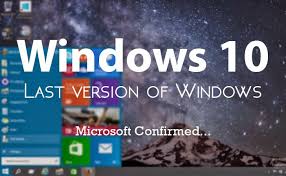 Pada tanggal 29 Juli 2015 windows 10 sudah rilis secara resmi dari microsoft, namun windows 10 ini masih merupakan windows 10 Final RTM ( Release To Manufacturing). Jadi sebenarnya windows 10 Final ini masih belum dapat diperjualbelikan secara bebas, hanya untuk kalangan tertentu saja.
Baru sehari saja rilis windows 10 Final ini sudah didownload dan digunakan oleh jutaan orang di seluruh dunia, bahkan mereka juga mengakui jika windows 10 Final ini merupakan windows terbaik yang dirilis oleh microsoft selama ini. Selain tampilannya yang sangat elegan, windows 10 Final ini juga sangat ringan untuk digunakan.
Disini kami membagikan juga activator windows 10 ini, jadi anda akan mendapatkan Windows 10 Final Full Version dengan gratis di gigapurbalingga ini. Oh ya jika diminta serial saat proses instalasi silahkan skip saja, karena nanti anda dapat mengaktifkan windows 10 Final ini dengan activator yang kami bagikan disini.
Baru sehari saja rilis windows 10 Final ini sudah didownload dan digunakan oleh jutaan orang di seluruh dunia, bahkan mereka juga mengakui jika windows 10 Final ini merupakan windows terbaik yang dirilis oleh microsoft selama ini. Selain tampilannya yang sangat elegan, windows 10 Final ini juga sangat ringan untuk digunakan.
Disini kami membagikan juga activator windows 10 ini, jadi anda akan mendapatkan Windows 10 Final Full Version dengan gratis di gigapurbalingga ini. Oh ya jika diminta serial saat proses instalasi silahkan skip saja, karena nanti anda dapat mengaktifkan windows 10 Final ini dengan activator yang kami bagikan disini.
System Requirements
- Processor: 1 gigahertz (GHz) or faster processor or SoC
- RAM: 1 gigabyte (GB)
- Hard disk space: 16 GB for 32-bit OS 20 GB for 64-bit OS
- Graphics card: DirectX 9 or later with WDDM 1.0 driver
- Display: 800×600
SHA1 : D927A91E1DD7D9C6023D0DA1DBCB16DEFEC5B6C1
Untuk Cara Mengaktifkan Windows 10 Klik DISINI
Untuk Cara Mengaktifkan Windows 10 Klik DISINI
Download Windows 10 Pro Final MSDN 32 Bit Full Version
Single Link
From Turbobit
Windows 10 Pro Final RTM 32 Bit (2.7 Gb)
From UsersCloud
Windows 10 Pro Final RTM 32 Bit (2.7 Gb)
TusFiles
Windows 10 Pro Final RTM 32 Bit (2.7 Gb)
OpenLoad
Windows 10 Pro Final RTM 32 Bit (2.7 Gb)
@1 Gb / Links
From Turbobit
Windows 10 Pro Final RTM 32 Bit_Part 1
Windows 10 Pro Final RTM 32 Bit_Part 2
Windows 10 Pro Final RTM 32 Bit_Part 3
UsersCloud
Windows 10 Pro Final RTM 32 Bit_Part 1
Windows 10 Pro Final RTM 32 Bit_Part 2
Windows 10 Pro Final RTM 32 Bit_Part 3
TusFiles
Windows 10 Pro Final RTM 32 Bit_Part 1
Windows 10 Pro Final RTM 32 Bit_Part 2
Windows 10 Pro Final RTM 32 Bit_Part 3
@390 Mb / Links
MirrorCreator
Windows 10 Pro Final RTM 32 Bit_Part 1
Windows 10 Pro Final RTM 32 Bit_Part 2
Windows 10 Pro Final RTM 32 Bit_Part 3
Windows 10 Pro Final RTM 32 Bit_Part 4
Windows 10 Pro Final RTM 32 Bit_Part 5
Windows 10 Pro Final RTM 32 Bit_Part 6
Windows 10 Pro Final RTM 32 Bit_Part 7
Windows 10 Pro Final RTM 32 Bit_Part 8
Download Aktivator Windows !0
Available link for download
How to reset waste ink pad on Brother DCP 770CW
How to reset waste ink pad on Brother DCP 770CW
 Laptop dan komputer dengan kerusakan Blue Screen / Dump memory / Layar Biru. Kasus ini sering banget terjadi dan ada beberapa dari kita yg sampai bingung menghadapinya.... OK langsung menuju ke TKP ...
Beberapa notebook / laptop / komputer terkadang muncul bluescreen. Sebenarnya banyak sekali kemungkinan yang muncul, pada dasarnya bluescreen muncul karena terjadi kesalahan data pada alamat tertentu baik itu data rusak (corrupt), data hilang (missing).
Penyebab Laptop dan Komputer Blue Screen / Dump memory / Layar Biru :
1. Memory / RAM
2. Socket Memory / RAM
3. Harddisk bermasalah
4. Socket Harddisk
5. Virus
6. Data corrupt terhapus tidak sengaja
7. Uninstall program sehingga library windows terhapus
8. dll
Bluescreen akibat memory / RAM rusak atau kotor
Bluescreen yang diakibatkan oleh memory dapat kita ketahui dengan mencoba check memory melalui menu BIOS notebook yang bersangkutan.
Apabila kita sudah memastikan kerusakan di area memory baik RAM itu sendiri maupun socket, maka langkah pertama yang dapat dilakukan. Kita lepas memory yang bersangkutan dan kita bersihkan atau sikat dengan penghapus pensil bagian kaki socket RAM sehingga kerak menjadi bersih, apabila masalah tetap muncul, kita dapat mengganti dengan RAM yang baru.
Apabila cara diatas masih belum efektif , ada kemungkinan socket / dudukan RAM kita bermasalah.
Bluescreen akibat Harddisk yang bermasalah
Harddisk yang bermasalah dapat juga menyebabkan bluescreen, antara lain dikarenakan oleh bad sector, data yang hilang karena virus, instalasi program yang tidak sempurna , ataupun dikarenakan un-install program yang menghapus library (.dll) file yang digunakan oleh system atau program yang akan kita jalankan.
Untuk masalah bad sector dapat kita atasi dengan chkdsk/f , dimana windows akan memberikan tanda agar bagian yang bad tidak digunakan. Btw, apabila yang terkena sector awal atau untuk operating system maka cara ini tidak effektif, cara terbaik adalah mengganti harddisk dengan yang baru.
Apabila error karena virus kita dapat menggunakan antivirus untuk cure (mengobati) file yang corrupt, dan tidak semua file corrupt dapat diobati oleh anti virus, alternatif lain adalah install ulang operating system.
Semoga membantu ....
Available link for download
Subscribe to:
Posts (Atom)