Showing posts with label laptops. Show all posts
Showing posts with label laptops. Show all posts
Friday, December 2, 2016
How to remove HDD user password in Acer laptops
How to remove HDD user password in Acer laptops

This article provides you with details about removing HDD/BIOS user password. If you key in the wrong HDD password three times, an error code is generated like the one in the picture below.
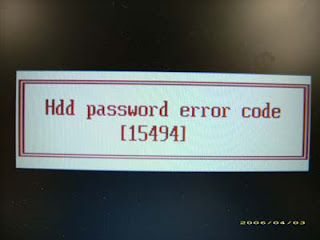
To reset the HDD user password, perform the following steps:
- On a different machine, run the HDD_PW.EXE file along with the error code generated. For example:
hdd_pw 15494 0
- Select an option to generate upper case or lower case ASCII code for unlocking the HDD.
- Two strings are generated as output. Select and note down either one of the strings.
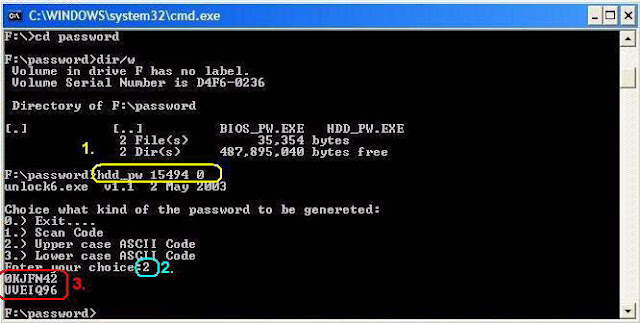
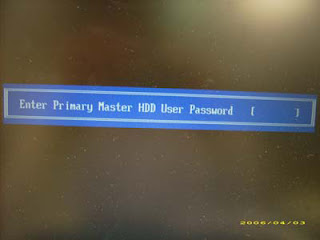
4. Reboot the machine with the locked HDD and then use either one of the strings as the HDD user
password.
Download Link
Available link for download

Wednesday, October 19, 2016
How to Remove Bios Password for Acer Laptops
How to Remove Bios Password for Acer Laptops

If you key in the wrong Supervisor password three times, an error code is generated and system is disabled like in the image below.

To unlock the BIOS, perform the following steps:
1. On a different machine, run the BIOS_PW.EXE file along with the error code generated. For example:
bios_pw 14452 02. Four ASCII strings are generated as output. Select and note down any one of the strings.

3. Reboot the machine with the locked BIOS and then use either any of the strings as the BIOS user
password.

Download link
Available link for download
Subscribe to:
Posts (Atom)