Tuesday, March 21, 2017
Epson R200 R210 R300 R310 Waste Ink Counter Pad Reset
Epson R200 R210 R300 R310 Waste Ink Counter Pad Reset
Here is how to reset the waste counter for the Epson R200, R210, R300 and R310 printers.
- Press and hold “Stop”, “Maintenance”, and “Power” buttons for about 10 seconds. A message will come on the screen saying counter is reset and to turn the printer off. The R200 and others don’t have a screen so just wait until the 10 seconds is up.
- Turn the printer off, unplug the power cord. Wait about 1 minute and power the printer back up. The counter will be reset. That’s all there is to the reset procedure.
Is the waste pad full ?
If the waste pad is actually full and ink is about to overflow, then you need to install a waste container. You can see the waste pad by opening the access panel on the back of the printer.
Changing the waste pad requires almost complete disassembly of the printer, it is a big job. There is an easier way.
Open the access panel on the rear of the printer (remove screw) and look inside carefullly with a flashlight. You will see a tube (down and to your left) coming from the cleaning pump and it will have an open end on it. This is the tube that delivers ink to the waste pad.
Use a piece of coathanger wire or equivalent, and fish out this piece of tube. Bring it to the outside of the printer, thru the access panel.
Find yourself a suitable container (Tupperware or a plastic cup or jar) that is not too tall. Put the tube into this container and secure the tube and container so they won’t come apart or lose connection if the printer is moved.
If you wish you can make a hole or notch in the access panel cover so it can be replaced.
Now the ink will go into this container and not into the waste pad inside the printer. If it gets full, dump it.
Note: This information and a couple of photos are also available on Steve’s Digicam Forum (http://stevesforums.com/forums). Goto Printers-Photo Inkjet-Epson R200-210 & R300-310 Mod
Download Software Resetter for Epson R300-310
Available link for download

Thursday, March 16, 2017
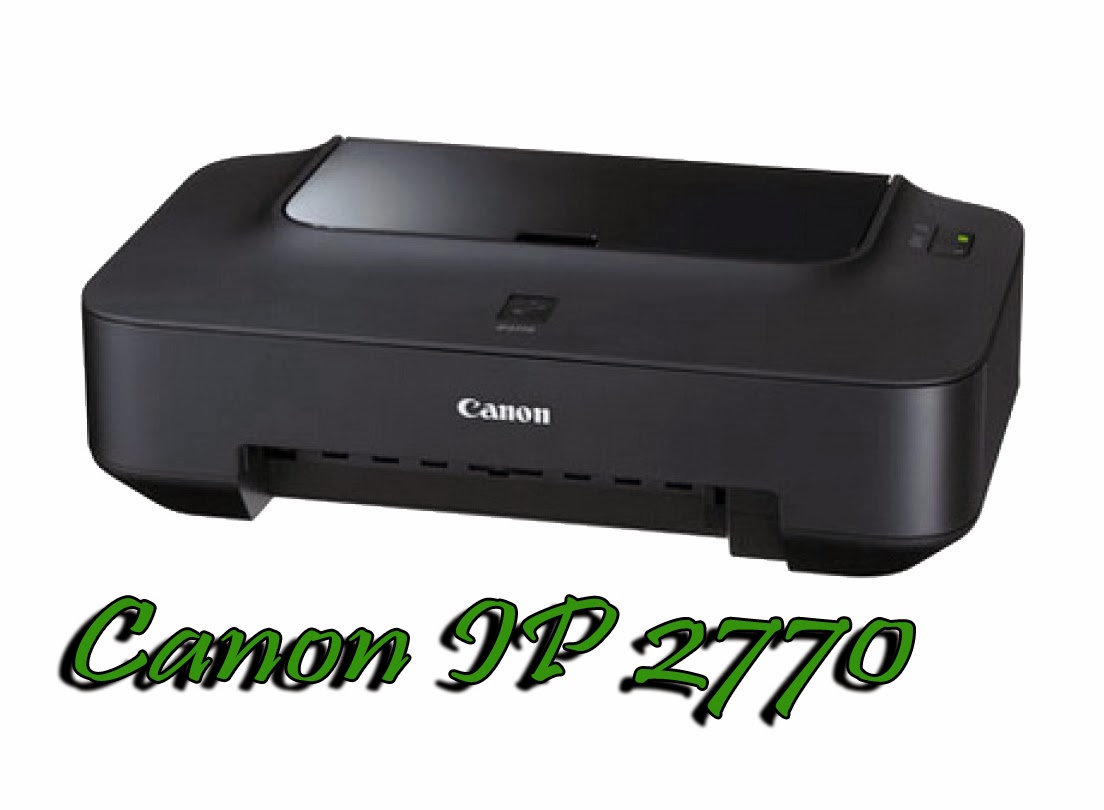
How To Reset Canon IP 2770 Ink Pad
How To Reset Canon IP 2770 Ink Pad
Canon IP 2770, the printer is cheap, only 14 $ US you can buy it.
But, sometimes, people prefer to inject this printer, in order to give more time to refill the ink.
- Buy tools, such as ink tank, ink hose, and plastic glue.
- You make a hole in the cartridge (3 mili meters).
- Connect hose, ink tank and catridge.
- And finnaly fill ink tank with ink.
If the ink pad or absorber is full, you wont can printing anything.
The indication in the printer is blinking green and orange alternately..
But dont worry, I have a solution to solve that problem.
First you will need a resetter.
You can download the resetter by clicking link below :

And you must reset the printer in service mode.
This is the steps how to come to service mode :
- Push the reset button on your printer about 2 seconds, and then push the power button, so, now you push that two button.
- Release your finger at reset button, so, now you only push the power button.
- In condition you push power button, dont release it. And push the reset button six times.
- Now, you in service mode.
- The indication is, appear found new device at your monitor.
- Extract the downloaded resetter and Open the resetter.
- Click EEPROM button, and please wait until the proccess is completed, if the proccess is completed your printer should print automatically, and appear an information if the proccess was completed.
- Then, Click Cleaning button, and wait until appear an information that cleaning proccess is completed.
- In pannel Clear Ink Counter, Click set, and please wait until appear an information that the function was completely finished.
- Finnaly, click set button in pannel Ink Absorber Counter. And please wait until completely finish.
- If all of steps 1 until 5 have done, look at your printer LED indication, it will becomes green again.
Available link for download
Monday, March 6, 2017
How to reset waste ink pad on Canon Pixma MP210
How to reset waste ink pad on Canon Pixma MP210


Trus bagaimana cara mengatasi Canon Canon MP237 Error P07 dan E08 :

- Hidupkan Printer Canon Canon MP237, maka di panel LCD nya akan muncul error P07 / E08, dan ada keterangan " The Ink Absorber is Almost Full " dilayar monitor anda.
- Download Resetter Canon MP237 di LINK INI. Anda akan diarahkan ke iklan dulu, trus klik SKIP ADS/LEWATI.
- Printer Canon Canon MP237 harus dalam keadaan SERVICE MODE. Caranya baca langkah berikutnya.
- Matikan Canon Canon MP237 yang error P07 / E08 dengan menekan tombol POWERnya. Jangan cabut kabel power
- Tekan dan Tahan tombol STOP/RESET diikuti dengan menekan Tombol POWER. Jadi kedua tombol posisi tertekan.
- Lepas tombol STOP/RESET tapi jangan lepas tombol POWER.
- Dalam keadaan tombol POWER masih tertekan, tekan tombol STOP/RESET sebanyak 6 kali.
- Kemudian lepaskan kedua tombol bersamaan. Maka Canon Canon MP237 akan berada dalam kondisi Service Mode.
- LCD Panel Canon MP237 akan blank / gelap dan di komputer anda akan mendeteksi hardware baru. Abaikan saja ...
- Anda masih bersama ekohasan blog, Langkah selanjutnya Exctract dan Jalankan Service Tool 3400 hasil download anda tadi.
- Di menu absorber Clear ink counter pilih Main kemudian klik SET di sebelah kanannya.
- Di menu ink absorber counter pilih Main kemudian klik SET di sebelah kanannya.
- Kemudian klik EEOPROM. maka printer akan cetak 1 halaman.
- Printer Canon Canon MP237 yang error P07 / E08 akan normal kembali.
Available link for download
Sunday, February 26, 2017
How to reset waste ink pad counter on Epson printer
How to reset waste ink pad counter on Epson printer

Solution 1: free
- Dowload SSC Service Utility Software.
- You can reset all these printers: Epson Stylus ?olor 400/440/480 LPT/480SXU/580/600/640/660/670/680/777/740/760/ 800/850/860/880/900 / EM-900C/980/1160/1520/3000
C20 / C40 / CL-750/C41 / C42 / C43 / C44 / C45 / C46 / C47 / C48/C50/C60/C61
C62 /C63 / C64 /C65 / C66/C67 / C68 / D68/C70/C80/C82/C83 / C84/C85 / C86/C87
C88 / D88 and PE
Photo RX420 / RX425 / RX430 /RX500 / RX510/RX520/RX600 / RX610/RX620/RX700 CX3100 / CX3200/CX3500 / CX3600 / CX3650/CX3700/CX3800 / CX3810 / DX3800/CX4500 CX4600/CX4100 / CX4200 /CX4700 / CX4800/DX4200 / DX4800 /CX5100 / CX5200 /CX5300 / CX5400 CX6400 / CX6600 /CX6300 / CX6500 /CX7800 Photo /Photo EX /Photo 700 / IP-100/750 / PM-770C /780 / 790 /
PM-780C /810 / 820
Photo 820 /825 / 915/830 / 830U/870 / PM-875DC /R200 / R210/R220 / R230
R300 / R310 / Photo R320/R800 / PX-G900/R1800/R2400/890/PM-890C/PM-A700
PM-G720/PM-970C/895/ 785EPX
Photo 900 /925 / 935/ 950 / 960 / PM-950C/1200 / PM-3000C/1270 / PM-3300C/1280 / PM-3500C
Photo 1290/2000P/2100/2200 / PM-4000EPX/Pro 5000 / PM-5000C
Solution 2: free
- On this Epson Website https://ipr.ebz.epson.net/ipr/maintenance.do you can reset these printers: Artisan 50, 700, 710, 725, 800, 810, 835, PictureMate Charm PM225, PictureMate Dash, PictureMate Show PM300, PictureMate Zoom, Stylus C120, Stylus CX4400, CX4450, Stylus CX7400, CX7450, Stylus CX8400, Stylus CX9400Fax, Stylus NX100, NX105, NX200, NX215, NX300, NX400, NX415, NX420, NX510, NX515, NX625, Stylus Photo R1900, R280, R2880, RX595, RX680, WorkForce 30, 40, 60, 310, 315, 320, 323, 325, 500, 520, 600, 610, 615, 630, 633, 635, 840, 1100
Solution 3: you have to pay
- Download WIC Reset Utility, You can do many things like: checking the current value of waste ink counters and ink level counters, resetting ink level counters in printers L100, L200, L800 only, cleaning printhead, and so on....
- But for restting the waste ink counter, you have to buy a reset key
Solution 4: you have to pay
- You can buy a disc to reset the waste ink counter on Ebay
Available link for download
Tuesday, February 21, 2017
How to reset waste ink pad on Canon Pixma MP520
How to reset waste ink pad on Canon Pixma MP520
Banyak timbul pertanyaan, “apakah bisa office 2003 dan 2007 diinstal dalam 1 pc ?” jawabnya tentu bisa. Hanya saja setelah kedua office itu diinstal, timbul masalah, yaitu loading yang lama ketika kita ingin membuka Word 2003 setelah kita membuka word 2007, atau sebaliknya. nah hal ini bisa kita atasi dengan menambah kode di regedit-nya windows..
Nah gini caranya :
Setelah office 2003 dan 2007 terinstal, klik Start, RUN. Pada kotak dialog Run yang muncul,
ketikan perintah berikut ini:
reg add HKCUSoftwareMicrosoftOffice11.0WordOptions /v NoReReg /t REG_DWORD /d 1
Tekan Enter lalu ketikan lagi perintah berikut ini:
reg add HKCUSoftwareMicrosoftOffice12.0WordOptions /v NoReReg /t REG_DWORD /d 1
selesai… sekarang membuka word 2003 dan 2007 tidak bermasalah lagi.
selamat mencoba….
Available link for download
Thursday, December 29, 2016
How to reset waste ink pad on Canon Pixma MP280
How to reset waste ink pad on Canon Pixma MP280
- First, download the Service Tool V1074.
- Turn off the printer
- Hold down the "stop/reset" and press the "power" button without release it.
- Release the "stop/reset".
- Press the "stop/reset" button six times and release the two buttons.
- The printer is now in service mode.
- Extract the Service tool and the file to open service tool page
- Find the "clear ink counter" section and click on the "main" button.
- Scroll down to find "ink absorber counter" on the left and to the right of that "counter value".
- Ink absorber counter box should read "main" and counter value reads "0".
- Click the set button to the right of the counter value box.
- The printer will now make some noise and will print a page of paper,
- If you are Facing more Problems Call Canon: +1-855-517-2433
Available link for download
Monday, December 19, 2016
Epson l100 Waste ink Pad Resetter Free Download
Epson l100 Waste ink Pad Resetter Free Download
 |
| Epson l100 |
Epson l100 Waste ink Pad Resetter Free Download
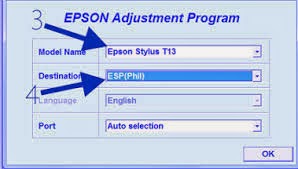
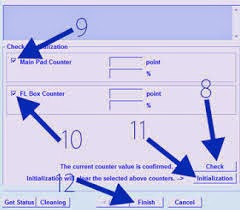
You can get programming resetter for Epson l100 Waste ink Pad Resetter Free Download, you can download at this association : Download Epson L100 resetter.- Turn on your printer, the LCD panel error E08, 5b00, p07 appeared, and the description of "Ink absorber is almost full" of your monitor screen.
- Take Resetter software on this page
- Your printer should be able to service mode. Should I read the next step.
- Turn off , by pressing the power button. note Do not unplug the power cord
- Then you press and hold the STOP / RESET, while pressing POWER.
- Delete button STOP / RESET, but do not lose the POWER button.
- Under these conditions, the power button is still depressed, press the STOP / RESET 6 times.
- Odnovremenno then release both buttons. when it is in service mode.
- The LCD panel on the printer blank / black and the computer will detect the new hardware. Ignore it.
- Are you still with ekohasan blog, Exctract next step and Instrument Services Run before you download.
- Absorber on the clear ink counter menu, select Play and press the SET button to the right.
- In the menu, the ink absorber counter select Home and press the SET button to the right.
- Then click EEOPROM. printer will print one page.
- And your printer will be normal again.
Epson l100 Waste ink Pad Resetter Free Download
Available link for download
Thursday, December 1, 2016
How to reset waste ink pad on Brother DCP 770CW
How to reset waste ink pad on Brother DCP 770CW
 Laptop dan komputer dengan kerusakan Blue Screen / Dump memory / Layar Biru. Kasus ini sering banget terjadi dan ada beberapa dari kita yg sampai bingung menghadapinya.... OK langsung menuju ke TKP ...
Beberapa notebook / laptop / komputer terkadang muncul bluescreen. Sebenarnya banyak sekali kemungkinan yang muncul, pada dasarnya bluescreen muncul karena terjadi kesalahan data pada alamat tertentu baik itu data rusak (corrupt), data hilang (missing).
Penyebab Laptop dan Komputer Blue Screen / Dump memory / Layar Biru :
1. Memory / RAM
2. Socket Memory / RAM
3. Harddisk bermasalah
4. Socket Harddisk
5. Virus
6. Data corrupt terhapus tidak sengaja
7. Uninstall program sehingga library windows terhapus
8. dll
Bluescreen akibat memory / RAM rusak atau kotor
Bluescreen yang diakibatkan oleh memory dapat kita ketahui dengan mencoba check memory melalui menu BIOS notebook yang bersangkutan.
Apabila kita sudah memastikan kerusakan di area memory baik RAM itu sendiri maupun socket, maka langkah pertama yang dapat dilakukan. Kita lepas memory yang bersangkutan dan kita bersihkan atau sikat dengan penghapus pensil bagian kaki socket RAM sehingga kerak menjadi bersih, apabila masalah tetap muncul, kita dapat mengganti dengan RAM yang baru.
Apabila cara diatas masih belum efektif , ada kemungkinan socket / dudukan RAM kita bermasalah.
Bluescreen akibat Harddisk yang bermasalah
Harddisk yang bermasalah dapat juga menyebabkan bluescreen, antara lain dikarenakan oleh bad sector, data yang hilang karena virus, instalasi program yang tidak sempurna , ataupun dikarenakan un-install program yang menghapus library (.dll) file yang digunakan oleh system atau program yang akan kita jalankan.
Untuk masalah bad sector dapat kita atasi dengan chkdsk/f , dimana windows akan memberikan tanda agar bagian yang bad tidak digunakan. Btw, apabila yang terkena sector awal atau untuk operating system maka cara ini tidak effektif, cara terbaik adalah mengganti harddisk dengan yang baru.
Apabila error karena virus kita dapat menggunakan antivirus untuk cure (mengobati) file yang corrupt, dan tidak semua file corrupt dapat diobati oleh anti virus, alternatif lain adalah install ulang operating system.
Semoga membantu ....
Available link for download
Tuesday, November 29, 2016
Epson L200 Ink Pad Error Resetter Free Download
Epson L200 Ink Pad Error Resetter Free Download
 |
| Epson L200 Ink Pad Error Resetter |
Epson L200 Ink Pad Error Resetter Free Download

- Turn on your printer, the LCD panel error E08, 5b00, p07 appeared, and the description of "Ink absorber is almost full" of your monitor screen.
- Take Resetter software on this page
- Your printer should be able to service mode. Should I read the next step.
- Turn off , by pressing the power button. note Do not unplug the power cord
- Then you press and hold the STOP / RESET, while pressing POWER.
- Delete button STOP / RESET, but do not lose the POWER button.
- Under these conditions, the power button is still depressed, press the STOP / RESET 6 times.
- Odnovremenno then release both buttons. when it is in service mode.
- The LCD panel on the printer blank / black and the computer will detect the new hardware. Ignore it.
- Are you still with ekohasan blog, Exctract next step and Instrument Services Run before you download.
- Absorber on the clear ink counter menu, select Play and press the SET button to the right.
- In the menu, the ink absorber counter select Home and press the SET button to the right.
- Then click EEOPROM. printer will print one page.
- And your printer will be normal again.
Epson L200 Ink Pad Error Resetter Free Download
Available link for download