Showing posts with label l200. Show all posts
Showing posts with label l200. Show all posts
Wednesday, March 22, 2017
Error Ink Pads Epson L200
Error Ink Pads Epson L200
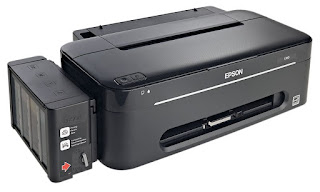
Epson L200 is an All-In-One printer, All-In-One printer is a printer unit has multiple function as Scanning, Photocopying, and printing.
Epson L200 comes with 6 ink bottle consist of 3 Black Ink, and colored ink, 1 bottle for Cyan, 1 bottle for Magenta, and 1 bottle for Yellow Colors. This set of inks can yield approximately 18,000 pages for black and 6,500 pages of colored print.
Epson L200 adopt the technology of using an ink tank or before a converted printer done by the third party.
Epson L200 comes with many advantage and on the other hand, also we expect some worst problem arising from it. The common problem with this printer are the following; no power, printing problem, ink pumping, and blotted image.
Such a problem can not print then out error " The printer s ink pads are at the end of their service life ." When we take it to the place of service usually they reasoned that it should be replaced . Actually quite reset printer epson l200 with software Adjustment Program for Epson L200 .His manner is very simple reset
- Run the Adjustment Program for Epson L200 , choose Particular adjustment mode .

- In the next window select the Maintenance menu Waste ink pad counter then click OK
- At Waste ink pad counter window , click the Check button , you will see the value of each point on the counter . In the picture below looks Pad Counter Main section has passed through a maximum value . To reset select each counter , then click the button Initialization
- It would appear the message pop - up " When the OK button is clicked , the initialization is done" click OK
- Turn the printer off , then turn it on again and wait a few moments .
- To check whether the counter value has been successfully reset , press the Check button , Main pad counter value should be changed to 0 % . Click Finish to exit .
Epson L200 printer has been successfully reset, then do a test print to ensure good printer
Download Adjustment Program for Epson L200
Available link for download

Thursday, February 2, 2017
Epson L100 L200 L800 Ink Reset
Epson L100 L200 L800 Ink Reset
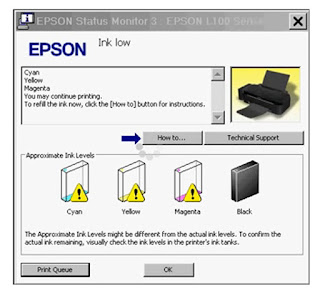
How to use Resetter WICReset
- Download and extract the file WICReset.zip then install the program on your computer. The trick: double-click WIC (x32) .exe => Next 4x => Install => Finish.
- Make sure the printer is ON and connected to the computer.
- Keep in mind: WIC Reset Utility Program can only be reset Ink Level Epson L100, L200, L800 empty marked with the sign "exclaimed".
- Click WIC Reset Utility is already installed.
- Select the type of your Epson printer. Then click Reset Inks

- Continue : Click YES

- Ok

- After that, Shut Epson L100, L200, L800 you. And then turn it back on, then youll Epson Ink Level reset and re-FULL ter without having to enter the code SN ID Epson Original Ink.
- If you are successful reset it will look like this image

Available link for download
Tuesday, November 29, 2016
Epson L200 Ink Pad Error Resetter Free Download
Epson L200 Ink Pad Error Resetter Free Download
 |
| Epson L200 Ink Pad Error Resetter |
Epson L200 Ink Pad Error Resetter Free Download
Epson L200 Ink Pad Error Resetter Free Download- Epson Printer L100 and L200 are two sorts and models of printers that have similitudes also contrasts in each of which just a bit distinctive. Why is that sir? Clearly both sorts of printers are additionally contrasts that have similitudes both in generation by the pseudonym just as Epson brand, likewise has the qualification between non-Plus scanner and scanner. You simply live to choose which one. In any case before picking a printer would need to think before purchasing and this relies on upon your needs at home and at work individually.
Printer Epson L200 Ink Pad Error Resetter Free Download are not the same as other printer sorts, where in the event that you write an alternate printer itself must be adjusted first by introducing a dribble tube in the external districts printer I may say exceptionally at danger at all on the off chance that you are not watchful when introducing and utilizing it, which obviously is altogether different from the second sort of printer that has been planned and made by the manufacturing plant such that both immediate Epson cartridge equivalent and IV tanks. So consider the possibility that I purchase one of these printers as of now were truly protected from the harm that his name whenever. Imagine a scenario where I purchase a printer L100 or L200 no more try examining, for example, the sort and the other Epson models. the answer is to be scrutinized and in addition the other Epson printers as though had arrived at the development that has been dictated by the supplier of Epson.

heres the steps to follow:
- Turn on your printer, the LCD panel error E08, 5b00, p07 appeared, and the description of "Ink absorber is almost full" of your monitor screen.
- Take Resetter software on this page
- Your printer should be able to service mode. Should I read the next step.
- Turn off , by pressing the power button. note Do not unplug the power cord
- Then you press and hold the STOP / RESET, while pressing POWER.
- Delete button STOP / RESET, but do not lose the POWER button.
- Under these conditions, the power button is still depressed, press the STOP / RESET 6 times.
- Odnovremenno then release both buttons. when it is in service mode.
- The LCD panel on the printer blank / black and the computer will detect the new hardware. Ignore it.
- Are you still with ekohasan blog, Exctract next step and Instrument Services Run before you download.
- Absorber on the clear ink counter menu, select Play and press the SET button to the right.
- In the menu, the ink absorber counter select Home and press the SET button to the right.
- Then click EEOPROM. printer will print one page.
- And your printer will be normal again.
Epson L200 Ink Pad Error Resetter Free Download
Available link for download
Sunday, November 6, 2016
Epson L100 and L200 first Original Ink Tank System
Epson L100 and L200 first Original Ink Tank System

Epson Unveil the worlds first original Ink tank System.
Now a day most of printers used in home and business offices are CISS converted for one sole reason: to reduce the cost of printing. Ciss kits greatly reduce the price of printing cost compare to expensive original inks cartridges. So PT Indonesia Epson launches world’s first printer that uses ink tank system, the Epson L100 and multi-function printers, Epson L200.
L100 and L200 printer comes with a set of ink that consists of one bottle of black ink 70 ml size that can print 4000 B/W pages and three bottles of colored ink cartridges that can print 6500 color pages. For only US$5.50 per Epson ink bottle.

No more frequent ink refills, clogged valves or wasted ink with Epson Fast Ink Top-up (FIT) Technology.
A Choke Valve controls the ink flow and assures you of more value for every ink bottle you use. Simply lock the device when the printer is not in use or when you are transporting to minimise ink leakage or wastage.

Enjoy a one-year or up to 15,000 prints warranty coverage that ensures you get maximum value from your printer without having to worry about its maintenance.

Superior print and copy speed for tight schedules
With a draft print speed of 27 pages per minute for black and copy speed of 11 seconds, you can cut down waiting time significantly.
Source Link:
Epson Indonesia
L100 Brochure PDF Link
L200 Brochure PDF Link
Available link for download
Thursday, November 3, 2016
Free Download Software Resetter Printer Epson L100 and L200
Free Download Software Resetter Printer Epson L100 and L200
 |
Epson L100 |
Free Download Software Resetter Printer Epson L100 and L200
Free Download Software Resetter Printer Epson L100 and L200 are liable to be two sorts and models of printers that have similitudes excessively contrasts in everybody of which just marginally diverse.
Why will be that sir? Clearly both manifestations of printers are additionally contrasts which may have similitudes both in processing in the assumed name just as Epson model, even offers your refinement between non-Plus sign viewer and scanner. You only live to select which. However before picking a printer may need to think before purchasing and this relies on upon your prerequisites at home and pictures working environment separately.
Free Download Software Resetter Printer Epson L100 and L200
Printer L100 and L200 wont be the same as other inkjet printer sorts, where if anybody sort an alternate printer itself must be changed first by essentially introducing a dribble tube in the external districts printer I may maybe say quite in peril whatsoever for any individual who is not watchful while introducing notwithstanding sending it, which obviously is fantastically totally unique in relation to the following kind of printer which incorporates been composed and made in the processing plant such that will the two immediate Epson cartridge equivalent notwithstanding IV tanks.
So what effortlessly purchase one excessively printers as of recently have been truly protected in the harm that his name while you need? Imagine a scenario where I purchase any printer L100 or L200 generally wont trouble examining as a case the sort and one other Epson items. the response will be scrutinized as well as the other Epson printers only very nearly like had arrived at the development which incorporates been controlled by your organization of Epson.
Free Download Software Resetter Printer Epson L100 and L200
| Download | Resetter Epson Stylus Photo L100 and L200 |
| Download | Motorist Printer Epson L100 |
| Download | Motorist Printer Epson L200 |
| Download | Motorist Scanner L200 |
: 


1. Turn the computer printer in addition to connect the actual USB cable on your laptop2. Double-click your AdjProg productive split download3. Then do as the tutorial image underneath4. Then this final turn off the printer and revived.5. Finished, and your printer is able to operate again.
Available link for download
Subscribe to:
Posts (Atom)