Showing posts with label tank. Show all posts
Showing posts with label tank. Show all posts
Sunday, March 26, 2017


Wednesday, January 18, 2017
How to Reset Waste Ink Tank Canon SmartBase MP730
How to Reset Waste Ink Tank Canon SmartBase MP730
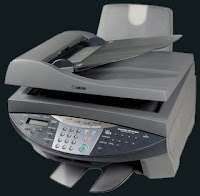 Canon SmartBase MP730 All In One InkJet Printer short reviewCanon SmartBase MP730 Photo offers you the best available quality in an easy to use All in One machine guaranteeing high speed and high productivity.
The SmartBase MP730 Photo delivers top Canon photo print quality with 4800 x 1200 dpi and 2 picoliter consistent droplet size. The newly developed Micro-Nozzles coupled with Advanced MicroFine Droplet Technology reduce graininess to ensure you of the clearest, crispest photo and text prints available. And, it prints and copies a phenomenal 22 pages per minute in monochrome and 14 pages per minute in color
Manual Reset procedure for waste ink tank full error in Canon Smartbase MP730 printers :
Hit the ”menu“: Key
Hit ”Copy“ Key
Hit ”#“ Key
Scroll thru the menu headings until you come to ”Test Mode“ - 12th headin
Hit the ”3? button- this will bring up Eeprom Clear
Hit ”0? button
Hit the ”Cancel“ button
Available link for download
Tuesday, January 10, 2017
How to Reset Waste Ink Tank Canon MP390 and Canon MP360
How to Reset Waste Ink Tank Canon MP390 and Canon MP360
 Canon MultiPass MP390 Multifunction Review
The Canon MP390 is a great multifunction printer for small homes. For most homes and small businesses, space is a consideration when buying office machines, which is exactly why multifunctions like the MultiPass MP390 from Canon are such a popular choice. By combining printing, copying, scanning, and fax functions into one convenient unit, you can save on valuable desktop space, while taking advantage of all the functionality normally provided by four separate peripherals. The MP390 can also print high-quality color photos directly from compatible cameras and memory cards.
Canon MultiPASS MP360 is All-in-One (Printer - Copier - Scanner) multifunction Inkjet printer, designed for home and small office.
Manual Reset procedure Waste Ink Tank for Canon MP390 and Canon MP360 Just Follow this step to reset waste ink tank full:
- Start with printer on, press aadditional functions, Scan, Copy, Scan. Now you should be in service mode.
- Select Test mode which is like the last available selection
- Select #8 Printer Test, it will do something here like cleaning or something then it will come up with some other option this is where it gets a bit confusing cause now all it says is like 8-2 or 8-3 push the + or - button until it says 8-3 then hit the select button
- The menu will now say EEPROM Clear
- Select Ink count which is option (0) and press set
- Then press Reset Followed by the power button and then wait for it to restart.
Available link for download
Sunday, November 6, 2016
Epson L100 and L200 first Original Ink Tank System
Epson L100 and L200 first Original Ink Tank System

Epson Unveil the worlds first original Ink tank System.
Now a day most of printers used in home and business offices are CISS converted for one sole reason: to reduce the cost of printing. Ciss kits greatly reduce the price of printing cost compare to expensive original inks cartridges. So PT Indonesia Epson launches world’s first printer that uses ink tank system, the Epson L100 and multi-function printers, Epson L200.
L100 and L200 printer comes with a set of ink that consists of one bottle of black ink 70 ml size that can print 4000 B/W pages and three bottles of colored ink cartridges that can print 6500 color pages. For only US$5.50 per Epson ink bottle.

No more frequent ink refills, clogged valves or wasted ink with Epson Fast Ink Top-up (FIT) Technology.
A Choke Valve controls the ink flow and assures you of more value for every ink bottle you use. Simply lock the device when the printer is not in use or when you are transporting to minimise ink leakage or wastage.

Enjoy a one-year or up to 15,000 prints warranty coverage that ensures you get maximum value from your printer without having to worry about its maintenance.

Superior print and copy speed for tight schedules
With a draft print speed of 27 pages per minute for black and copy speed of 11 seconds, you can cut down waiting time significantly.
Source Link:
Epson Indonesia
L100 Brochure PDF Link
L200 Brochure PDF Link
Available link for download
Subscribe to:
Posts (Atom)