Saturday, February 25, 2017
How to Fix Printer Error Canon IP2770
How to Fix Printer Error Canon IP2770
How to Fix Printer Error
 |
| How to Fix Printer Error |
Canon iP2770 photo printer Attractive Paper
paper hours
cartridges are not installed
Full Absorber or iP2770 Printer Reset
- First you press and hold the Resume button for 10-15 seconds, when the lights blink is back to normal is a sign of success, and if not normal you have to try the second way
- For the second way we use the following resetter tool application how to use it
- First you turn your printer
- Then turn off the printer by pressing the power button hold recall without unplugging the power cord from the electrical current source
- You hold the reset button for 3-6 seconds
- simultaneously press the power button and then hold down the resume
- Press the resume button 5 times just enough, remember the power button is in the state on tap. then the indicator lights will bergonta dai color green to orange
- if the previous step has been done, release the power button and resume simultaneously
- Then your computer will detect the new device
- put the paper in the rear tray, or commonly called a paper
- open and run Resetter then you click on the button "Play".
Canon iP2770 photo printer Removing Ink or recent results
- Indications and conditions infusion: The results can be the same print as kategory easy, even a certain color can not go out at all, the condition of IV tubes are airspaces of more than 5 cm from the cartridges, or there is an air cavity is small - small drip hose
- How to handle: do not forget to do first steps - steps such as Category Easy handling, if still not able to prepare the next step of ink injections (without the needle) and then open the tube cap small ink cartridge of the color in question. Put the tip of the injection tube into the hole so that the vacuum conditions. For security first hose clamp with a paperclip. Then open the cartridges and remove the IV line is problematic then place a tissue at the end of the hose, opened paper clip, then slowly - slowly lowered so that the injection of cavities on the IV tube missing. After that input again into the IV tube cartridges.
- Condition IV tube: hollow infusion previously will be pushed out by the pressure of the injection, so that the hose will be normal again. Keep in mind when reinserting the cartridges make sure the hose is normal no cavities.
Searches related to fix printer error canon ip2700
Available link for download

Wednesday, February 1, 2017
Error P10 canon MP258 MP287 error B200 IP2770
Error P10 canon MP258 MP287 error B200 IP2770
> BAHAN
- BROWSER
- NOTEPAD
- GMAIL
> TUTORIAL
- BUAT AKUN GMAIL TERLEBIH DAHULU www.gmail.com
- SELANJUTNYA MASUK KE www.twitter.com / www.m.twitter.com
- jika email yang kita buat tadi beralamat Zulfanirizki@gmail.com maka kita bisa ganti menjadi Z.ulfanirizki@gmail.com , Zu.lfanirizki@gmail.com , Zul.fanirizki@gmail.com , Zulf.anirizki@gmail.com. karena bagi GMAIL tanda titik itu tidak ada artinya , tapi bagi facebook / twitter itu sangat berarti.
- dengan kata lain jika anda mendaftar akun twitter dengan email Z.ulfanirizki@gmail.com , Zu.lfanirizki@gmail.com , Zul.fanirizki@gmail.com , Zulf.anirizki@gmail.com maka akan tetap terkirim ke Zulfanirizki@gmail.com
- INI ADALAH SS DARI BEBERAPA ACOUNT TWITTER YG SAYA BUAT DENGAN 1 AKUN GMAIL


- SETELAH AGAN BUAT DI www.twitter.com
- LALU KALIAN KE GMAIL DAN CONFIRMASI ACOUNT TWITTERNYA
- MAKA AKUN TWITTER ITU PERMANEN DAN SUDAH DI CONFIRM
> KALAU SUDAH BUAT JGN LUPA KALIAN CATET DI NOTEPAD
- USERNAME:PASSWORD
- MISALNYA katokbelok10 dan PASSWORD saputra
- MAKA KALIAN CATET DI NOTEPAD TANPA TANDA @ , dan tambahkan tanda : di antara username&password
- katokbelok10:saputra
Available link for download
Friday, January 27, 2017
How to reset Canon Pixma IP2770
How to reset Canon Pixma IP2770


+1-855-517-2433 (Toll Free)
Available link for download
Thursday, January 12, 2017
Free Download Resetter Printer Canon iP2770 Tool v3400
Free Download Resetter Printer Canon iP2770 Tool v3400
 |
Free Download Resetter Printer Canon iP2770 Tool v3400
- Turn on your printer, the LCD panel error E08, 5b00, p07 appeared, and the description of "Ink absorber is almost full" of your monitor screen.
- Take Resetter software on this page
- Your printer should be able to service mode. Should I read the next step.
- Turn off , by pressing the power button. note Do not unplug the power cord
- Then you press and hold the STOP / RESET, while pressing POWER.
- Delete button STOP / RESET, but do not lose the POWER button.
- Under these conditions, the power button is still depressed, press the STOP / RESET 6 times.
- Odnovremenno then release both buttons. when it is in service mode.
- The LCD panel on the printer blank / black and the computer will detect the new hardware. Ignore it.
- Are you still with ekohasan blog, Exctract next step and Instrument Services Run before you download.
- Absorber on the clear ink counter menu, select Play and press the SET button to the right.
- In the menu, the ink absorber counter select Home and press the SET button to the right.
- Then click EEOPROM. printer will print one page.
- And your printer will be normal again.
Free Download Resetter Printer Canon iP2770 Tool v3400

Available link for download
Wednesday, December 14, 2016
How to Fix Canon Pixma iP2770 error 5B00
How to Fix Canon Pixma iP2770 error 5B00

Available link for download
Sunday, October 30, 2016
Error B200 pada printer Canon iP2770 iP3680 MP258 MP287 MP278
Error B200 pada printer Canon iP2770 iP3680 MP258 MP287 MP278


Available link for download
Monday, October 24, 2016
How to solve error 5200 Canon iP2770 with canon upgrde firmware utility V1040
How to solve error 5200 Canon iP2770 with canon upgrde firmware utility V1040
CARA KERJA HACKING AKUN TWITTER
Twitter memiliki dua database (satu untuk pria dan satu untuk pengguna perempuan) di mana mereka menyimpan semua informasi dari pengguna mereka, jika Anda ingat email yang Anda gunakan untuk login namun lupa sandi, Anda dapat menggunakan Lupa kata sandi Anda? pilihan, namun jika seperti saya Anda tidak memiliki informasi yang tidak mungkin untuk memulihkan hukum account tersebut.
Jika Anda tahu apa-apa tentang website pemrograman Anda tahu Lupa kata sandi Anda? berada dalam kontak langsung dengan database untuk mengirim permintaan untuk mengambil informasi yang terlupakan untuk Anda, pada dasarnya apa artinya adalah jika Anda bertanya database untuk informasi yang login dengan kode hak (dalam kasus kami mengeksploitasi ), itu akan mengirimkan kembali informasi tersebut.
Jadi semua saya harus mencari tahu adalah apa kode dan apa sistem yang mereka digunakan untuk menghubungi database melalui Lupa kata sandi Anda? layanan, setelah beberapa minggu menulis dan menguji kode saya datang dengan orang yang tepat untuk pekerjaan itu dan setelah melakukan sedikit riset saya belajar Twitter menggunakan sesuatu yang mirip dengan layanan email untuk menghubungi database mereka.
Tapi seperti biasa, semuanya tidak semudah tampaknya. Untuk alasan keamanan database diprogram untuk memverifikasi account Anda meminta adalah benar kepunyaan Anda dan tidak seseorang elses sehingga mereka membutuhkan beberapa jenis otentikasi atau verifikasi (thats mengapa mereka mengirimkan link verifikasi ke email Anda saat membuat account Anda atau mengubah password Anda) , untungnya bagi kami Twitter begitu buruk diprogram mereka juga memungkinkan Anda untuk menggunakan teman / pengikut account untuk memverifikasi sendiri (itu kesalahan dalam layanan "Teman Reksa / Pengikut" di mana mereka mengotentikasi account dengan memeriksa jika terkait teman / email pengikut terkait dengan account korban), dengan kata lain, jika orang yang Anda ingin mendapatkan informasi login dari yang mengikuti Anda di Twitter dan mengikuti mereka ... Anda Anda dapat menggunakan akun Anda sendiri untuk memverifikasi mereka (dengan membingungkan database ke dalam berpikir kita memeriksa apakah Anda berdua saling mengikuti satu sama lain daripada tindakan yang benar reseting password mereka dan membuat mereka kirim pada kami) dan mendapatkan login email dan password yang dikirim ke Anda ... tapi korban harus mengikuti Anda dan Anda mereka
CARA MELAKUKANNYA
1) Pertama Anda akan membutuhkan untuk mendapatkan username dan username korban, bagaimana Anda melakukan ini?
Pergi ke profil twitter korban dan melihat address bar browser, pada akhir dari semua alamat Lihat sesuatu seperti ini

Menuliskannya di suatu tempat karena Anda akan perlu menggunakannya sedikit lebih bawah, setelah itu dilakukan Anda dapat melanjutkan ke langkah 2.
2) Di bagian bawah halaman ini saya telah menyisipkan kode eksploitasi saya buat untuk menipu database, ini adalah bagian yang rumit karena Anda harus mengedit kode sedikit diri Anda sehingga sesuai dengan kebutuhan Anda saat mencari informasi login korban .
Gulir ke bawah ke bagian bawah halaman ini dan menemukan kode saya telah disorot dalam warna abu-abu sehingga Anda tahu apa untuk menyalin, pilih kode dan salin ke clipboard (tekan CTRL + C) kemudian paste (CTRL + V) pada notepad atau dokumen teks sehingga Anda dapat mengeditnya.
3) Setelah Anda memiliki kode di suatu tempat Anda dapat mengeditnya, Anda akan perlu untuk memasukkan tiga hal ke dalamnya, username twitter korban dan otentikasi informasi teman login. Saya akan memberikan contoh langkah demi langkah dengan mencoba memanfaatkan kode akun teman saya Sarah sebagai korban, lihat bagian mana Anda harus mengedit dan dengan apa:
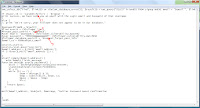
1. Harus username korban.
2. Harus Anda Login nama pengguna twitter untuk memverifikasi Anda korban pengikut / teman.
3. Harus sandi Anda sehingga database dapat otentik Anda benar-benar saling mengikuti satu sama lain dengan korban.
Saat mengedit kode, tidak sengaja menghapus salah satu tanda kutip (") itu tidak akan bekerja, jadi pastikan Anda menaruh informasi di dalamnya.
4) Sekarang bahwa Anda memiliki kode eksploitasi diedit dan siap untuk dikirim, kami siap untuk mengirimkannya ke database melalui email, karena bukan email biasa Anda, tetapi email mengeksploitasi kita harus menggunakan Subyek khusus sehingga database tahu bagaimana membaca dalam bahasa pemrograman.
Ke alamat email Anda dan Compose email baru untuk twittersupport@techie.com yang twitters pelanggan layanan email untuk password lupa, dalam salinan Subyek dan paste kode di bawah ini
$[search_database = $find user+id= "VICTIMSUSERNAME", %verification+user+gender = }"F"{ begin_search();
Setelah Anda mengedit Subjek dan memasukkan alamat email, email Anda Terdiri akan terlihat seperti gambar di bawah, saya akan berhitung setiap item:
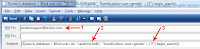
1. Alamat email dari layanan pelanggan lupa database twitter itu password.
2. Di sinilah Anda memasukkan username korban.
3. Di sinilah Anda memasukkan jenis kelamin korban (seperti yang disebutkan di atas database twitter terbagi dalam bagian pria dan wanita), menempatkan M di dalam tanda kutip jika mereka adalah laki-laki atau F jika mereka adalah perempuan.
5) Setelah Anda benar ditulis Kepada: dan Subject: bagian, Anda dapat melanjutkan untuk memasukkan kode exploit Anda sebelumnya diedit pada langkah 3 ke bagian tubuh email. Sekarang yang perlu anda lakukan adalah klik Kirim dan menunggu database untuk mengirimkan kembali jawaban itu dengan informasi.
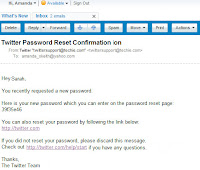
Ini harus mengambil dari 12-24 jam tergantung pada lalu lintas twitter memiliki hari itu, ini adalah contoh dari respon email Anda akan menerima:
THE EXPLOIT CODE
twt_select_db("find", $linkID) or die(twt_database_error()); $resultID = twt_query("SELECT FriendID FROM signup WHERE email = $email", $linkID) or die(twt_database_error()); $num_rows = db_num_rows($resultID); $row = twitter_fetch_array($resultID); $user_id = $row[0];
if ($user_id == "PUT_USERNAME_HERE") = $repeat {
print Success, We have sent you an email with the Login email and Password of that Username.
}
else {
// print "Were sorry, your follower does not appear to be in our database."
$passwordfromdb = $row[0];
$find userID = (%follower_list)
#forgot_pass_userid = "%repeat%"; <%search_database_for_id%>
#user email= "YOUR_USERNAME_HERE"; (%follower_vulnerability_match%)
#user password = "YOURPASSWORDHERE"; (%follower_vulnerability_matchk%)
$follower_database_exploit = %request_forgot_pass_info
$email_to = %%%@subject_email
session_start();
session_reset_pass("session");
$email_address = $_POST[email_address];
if (!isset($_POST[email_address])) {
}
elseif (empty($email_address)) {
echo $empty_fields_message;
function decrypt userID password() {
$salt = "abchefghjkmnpqrstuvwxyz0123456789";
srand((double)microtime()*1000000);
$i = 0;
while ($i <= 7) { $num = decrypt() % 33; $tmp = substr($salt, $num, 1); $pass = $pass . $tmp; $i++; } return $pass; } mail($email_address, $subject, $message, "Twitter Password Reset Confirmation } /end$
Available link for download
Monday, October 17, 2016
How to Reset Counter Canon ip2770
How to Reset Counter Canon ip2770

Available link for download