Tuesday, February 28, 2017
How to Reset Canon ip1980 and IP1880
How to Reset Canon ip1980 and IP1880

When you try to print and a pop-up message appear saying that "The ink absorber is full" it means that the ink absorber or wastepad inside your printer is almost full. In order to solve this you need a technical knowledge on how to disassemble the printer and software resetter.
FIRST STEPS: Entering Service Mode
First you have to enter in service mode state in order to used the resetter. To do that follow this procedure,
1. Unplug the power cable of the printer.
2. Press and hold down the power button with your index finger and then plug-in the power cable.
3. While holding down the power button, press the reset/resume button twice and release the power button
4. You will notice that the Alternate Blinking error is gone, this means that the printer is in Service Mode state.
5. Download Canon IP1980 Resetter Here
Download Canon IP1880 Resetter Here
SECOND STEPS: Using the Software
1. After you download the resetter, extract it and double click "GeneralTool"
2. Select or Check the EEPROM CLEAR then click the MAIN button, you will notice that the power button light will blink. It means that the it clear the waste ink counter.
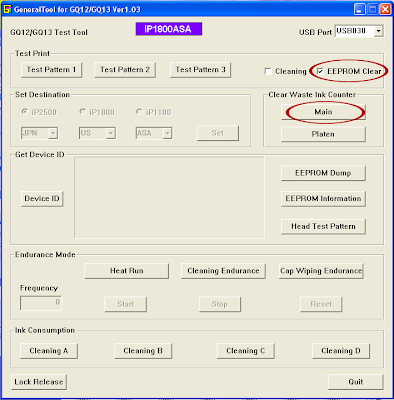
3. Unplug the power cable to turn off the printer
4. Then plug-in again the power cable. then turn ON the printer. And its DONE!
Warning: Getting rid of the error message won’t change that you might end up with ink leaking out of the printer if you don’t either replace or clean them.
Available link for download

Friday, February 17, 2017
Error Code for Printer Canon IP1300 IP1700 IP1200 IP1880 and IP1980
Error Code for Printer Canon IP1300 IP1700 IP1200 IP1880 and IP1980
Having problem with Canon IP1300, IP1700, IP1200, IP1880, IP1980. Sign that looked to be only led blinking. Following some solutions problem of printer that marked with led blinking.
3x Orange 1x green
Problem : any problem with printer mechanics
Solution: If you don’t have knowledge about printer mechanic, will better if bring the printer to Canon service center.
4x orange 1x green
Problem printer absorber full
Solution: Reset the printer using generaltools or software resetter. If not work using reset manual. Each printers having different set of manual reset
5x orange 1x green
Problem: Black or Color cartridge trouble.
Note: problem is usually caused many matters, for example chips error, conector is dirty, etc.
7x orange 1x green
Problem: Black or Color cartridge trouble.
Note: problem is usually caused many matters, for example chips error, conector is dirty, etc.
8x orange 1x green
Problem : printer absorber full (Waste Ink Pad Full)
Solution: Reset the printer using generaltools or software resetter. If not work using reset manual. Each printers having different set of manual reset
Available link for download
Monday, October 31, 2016
Error Code Kode Blinking Canon Pixma IP1200 IP1300 IP1600 IP1700 IP1880 IP1980
Error Code Kode Blinking Canon Pixma IP1200 IP1300 IP1600 IP1700 IP1880 IP1980
 Beberapa pembatasan pada printer antara lain pembatasan jumlah cetak, volume tinta, hingga pembatasan pada tangki pembuangan (waste ink tank). Sebagai contoh, jika printer digunakan untuk mencetak hingga mencapai batas yang telah ditentukan, ia akan berhenti mencetak dengan ditandai blinking (lampu led power & resume berkedip). Solusi bagi pengguna awan adalah dengan membawanya keservice center untuk memperbaikinya!
Printer jenis pixma IP1xxx memiliki pembatasan fitur. Printer jenis ini memiliki beberapa varian mulai dari Pixma IP1200, IP1300 sampai IP1700. Secara fisik kesemua tipe tadi terlihat sama. Perbedaan terdapat pada pembatasan fitur secara software/drivernya.
Berikut beberapa kode blink pada printer pixma IP1200, IP1300, IP1600, IP1700, IP1880, IP1980 :

- 7x green orange berkedip bergantian atau 1x green, 1x orange,1x green, 1x orange, 1x green …. : Waste Ink Pad Full / Ink Absorber Full. Printer anda perlu di reset dengan software general tool resetter.
- 3x Orange 1x green : Ada kerusakan di mekanik printer. Jika anda belum pernah membongkar printer, sebaiknya dibawa aja printer anda ke tempat servisan.
- 4x orange 1x green : Printer absorber full (Waste Ink Pad Full). Printer anda perlu di reset dengan software general tool resetter.
- 5x orange 1x green : Cartridge Warna / Hitam rusak. Ganti Cartridge warna / hitam, selesai. Kerusakan Cartridge disebabkan oleh banyak hal, antara lain : chip IC rusak, kotornya konektor, dll.
- 7x orange 1x green : Cartridge Warna rusak. Biasanya terjadi pada IP1980 blink 7x orange 1x green. Ganti Cartridge warna, selesai. Kerusakan Cartridge disebabkan oleh banyak hal, antara lain : chip IC rusak, kotornya konektor, dll.
- 8x orange 1x green : ink tank full. Printer anda perlu di reset dengan software general tool resetter.
- 14x / 15x orange 1x green : Cartridge hitam rusak. Ganti Cartridge hitam, selesai.
- Jika Printer dinyalakan lampu green nyala penuh tanpa blink (kedip-kedip), kemudian ketika dipakai untuk print baru blink berarti Cartridge anda mengalami “runout”. dan biasanya ada komentar di layar windows anda. solusinya : tekan tombol resume antara 10 – 20 detik kemudian lepaskan. Jika masih blink lagi ulangi lagi langkah tadi, bisanya hanya 2 kali yaitu untuk hitam dan warna. Kasus ini sering terjadi ketika Cartridge habis di isi ulang.
Available link for download