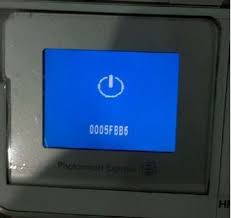
Solution 1 for error 0005fbb6:
- Uninstall the printer driver
- Disconnect the USB cable and the power from the printer
- Donwload the last driver on the HP website
- Install the driver
- Reconnect the cables when the program tells to do.
Solution 2: reset the printer
- Printer on, disconnect the USB cable.
- Remove the cartridges
- Wait for 10 seconds and disconnect the power cord
- Wait for 60 seconds.
- Reconnect the power cord
- If the printer do not turn on, press the power button.
- Insert the cartridges and close the door.
- Reconect the USB cable.
- Go to "Setup", then "Tools" and "Restore Factory Defaults"
- Power off and on.
